

Introduction: iGloo App Ai Review
Welcome to my comprehensive, honest review of iGloo App Ai. If you’re looking for a simple, AI-powered way to build your own online community and host courses without getting bogged down by complicated tech, you’re in the right place.
Below, you will find everything you need to know about this new release by Sam Bakker—no hype, no fabricated features, just the exact details on what it does, what it costs, and whether it’s worth your money.
If you’ve been putting off building a paid community because Skool/Circle-style platforms mean another monthly bill, and you like the idea of telling your own AI “Build me a four-lesson course” instead of clicking through twelve menus, iGloo App Ai is worth a serious look at $27. It’s a real, live, working platform — not a pre-sale — but it also has real limits (250 members per community, no native mobile app, no built-in email autoresponder) that are worth knowing before you check out, not after.
Quick Product Summary
- Product Name: iGloo App Ai
- Vendor/Creator: Sam Bakker
- Launch Date: September 13, 2026
- Front-End Price: $27 (One-time payment)
- Niche: Community Builder / Course Hosting / AI Software
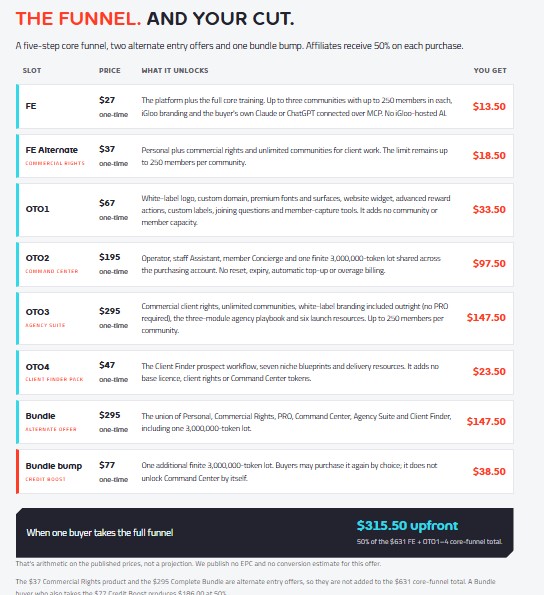
- Upsells: Commercial Rights ($37), PRO/OTO1 ($67), Command Center ($195), Agency Suite ($295), Client Finder Pack ($47), Complete Bundle ($295), Credit Boost ($77)
- Refund window: 30 days
- Payment model: One-time payments across the whole funnel — no subscription
- Skill level needed: Beginner-friendly
- Recommendation: Highly Recommended for coaches, course creators, and agency owners.
What is “iGloo App Ai”?
iGloo App Ai is a brand-new, cloud-based platform that allows you to build, host, and manage an online community, complete with courses, discussion feeds, events, and member roles.
Unlike most traditional community platforms where you have to manually piece together every section, iGloo was built after the AI revolution. It allows you to connect your existing ChatGPT or Claude account and build your entire community simply by typing commands. You tell the AI what you need—like “Build my new course with four lessons and drip it out weekly”—and the software generates it instantly while you watch.
How It Works: iGloo App Ai
- You connect your own AI. Core building actions (drafting courses, writing posts) run on the Claude or ChatGPT plan you’re already paying for, connected over MCP — not on iGloo’s own AI infrastructure.
- You type a request. Something like “Make me a community for my coaching clients” or “Drip this course out weekly, nothing unlocks until a week after they join.”
- iGloo builds it. The course, lesson structure, or post drafts appear inside your community.
- You approve before anything goes live. According to the vendor, there’s no AI that posts unsupervised — a human always approves the action first.
If you want iGloo’s own hosted AI running things like a member-facing concierge, a staff assistant, or an “Operator” panel that can act more autonomously, that’s a separate add-on (the Command Center, below) — it isn’t part of the $27 front end.
👉 [Ready to Build Your Community by Typing? Get Started Here.]
Its Key Features iGloo App Ai
- Community feed — posts, categories, member counts, and invites.
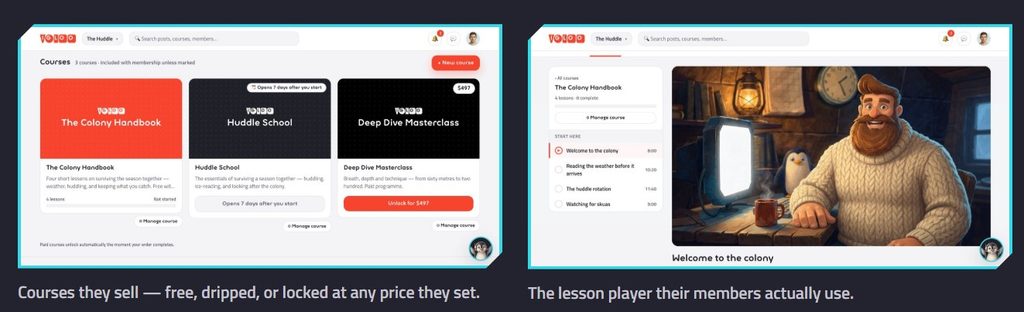
- Courses — free with membership, dripped on a schedule, or locked behind their own price.
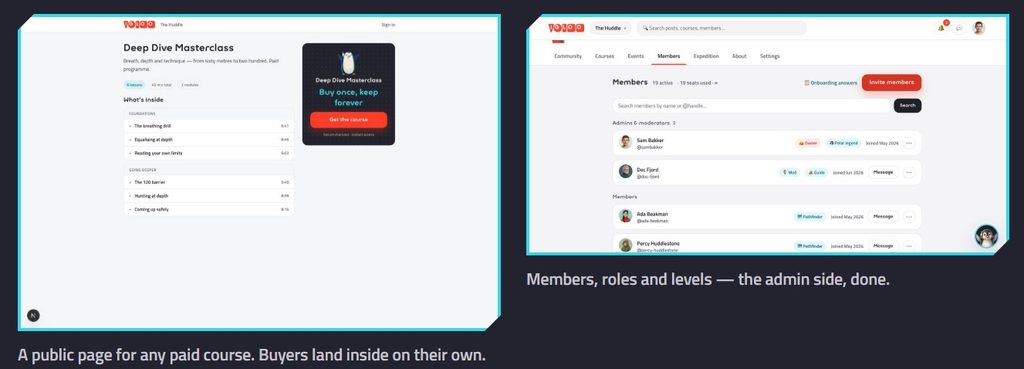
- Public course landing pages — buyers can land on a page and purchase a single course directly.
- Member management — roles and levels handled from an admin view.
- AI-assisted building — connect Claude or ChatGPT and build courses or draft posts by typing instructions.
- Up to 3 communities, 250 members each on the base front-end tier.
- White-label options (logo, custom domain, premium fonts/surfaces) — available starting at the PRO upgrade, not on the $27 tier.
- Command Center add-on — an AI-run member concierge, staff assistant, and Operator panel, powered by a finite, prepaid token pool with no auto-renew or surprise billing.
- Agency features — commercial client rights and an agency playbook, for anyone planning to sell community builds as a service.
- Client Finder Pack — a prospecting workflow and niche blueprints for finding people to sell communities to.
What Are the Benefits?
- Own Your Audience: Move your followers off rented platforms (like Facebook Groups) into a space that you completely control.
- Save Massive Amounts of Time: Because the AI does the heavy lifting, a process that usually takes weeks can be completed in minutes.
- Zero Recurring Costs: The front-end offer is a one-time $27 fee, saving you hundreds or thousands of dollars a year compared to platforms like Skool or Circle.
- Transparency: The limits are printed right above the buy button. You get up to 3 communities with up to 250 members each on the base license—no hidden tricks.
Why I Was Interested in iGloo App Ai
When iGloo App Ai first crossed my radar, a few specific things caught my attention immediately. If you have been in the digital marketing or course creation space for a while, you probably share some of these exact same frustrations.
Here is why I decided to look closer and test it out for this review:
- The Subscription Fatigue: I was tired of seeing community platforms charge premium monthly fees just to host a basic group and a few videos. The fact that iGloo App Ai offers one-time pricing with no recurring platform fees was a massive draw.
- The “Blank Canvas” Problem: Building a community usually means staring at a blank dashboard for days—setting up categories, formatting courses, and writing onboarding posts. iGloo App Ai is built from the ground up for AI integration. The promise of connecting my existing Claude or ChatGPT account and having the AI assemble the first working version just by typing sounded like a huge time-saver.
- Owning the Platform: Relying on free social media groups is getting risky because you don’t actually own your audience there. I was looking for a cost-effective way to move members into a private, owned space where I completely control the feed, the event schedules, and the courses.
- The Agency Potential: I noticed they offer a Commercial Rights license for $37. This allows you to build unlimited client communities. I immediately saw the potential to offer “Community Creation” as a premium service to other business owners, knowing the AI could do the heavy lifting for me.
My Hands-On Experience With iGloo App Ai
Instead of just looking at a sales page, it is important to understand how the software actually handles in practice. Most community platforms give you a blank dashboard and expect you to spend weeks manually clicking through settings. iGloo takes a completely different approach.
Here is my breakdown of what it’s actually like to use the software:
1. The Setup Process (Connecting the AI)
The first thing you notice inside iGloo is that the AI isn’t just a chatbot glued to the side of the screen; it is the control center for the entire platform. The setup involves connecting your existing Claude or ChatGPT subscription via MCP (Model Context Protocol).
This means the software leverages the AI you already pay for to do the heavy lifting. Once the API is connected, you are ready to start building without navigating complex menus.
2. The “Type-to-Build” Experience
This is where iGloo shines and where the famous “uncut demo” comes to life. Instead of dragging and dropping modules, you simply type instructions.
In testing, if you type a plain-English command like, “Build my new course — four lessons, and drip it weekly,” you literally watch the platform assemble the structure. The AI generates the course outline, sets up the modules, and applies the drip schedule in real-time. It is incredibly fast and eliminates the “blank page syndrome” that stops most course creators from finishing their projects.
3. Interface and Member Management
The user interface on the frontend is clean and modern, avoiding the cluttered feel of older forum software.
- The Feed: Functions much like a modern social network where members can post, comment, and interact.
- The Course Shelf: It organizes your paid, free, or dripped content beautifully.
- Admin Controls: You have full control over onboarding questions, member roles, and a gamified reward ladder.
Importantly, the AI does not run wild. A human always has to approve its actions, meaning you maintain complete editorial control over what gets published to your members.
4. Performance Realities (The Drawbacks)
A crucial part of any honest review is testing the limitations. Here is what you need to be prepared for when using iGloo:
- Video Hosting: You cannot upload heavy video files directly to the platform. You must host your lesson videos on YouTube, Wistia, Vimeo, or Loom, and embed them into the lessons.
- Mobile Experience: There is no native iOS or Android app to download from the app stores. Instead, it runs as a PWA (Progressive Web App). It is fast and responsive on mobile browsers, but it is not a standalone store app.
- Front-End Branding: If you only buy the $27 basic version, your community will display iGloo branding. You need the OTO1 (PRO) upgrade to utilize custom domains and white-label logos.
My Takeaway: If you hate dealing with technical setups and want a community running by this afternoon, the typing-to-build workflow is an absolute game changer. As long as you are fine embedding your videos from elsewhere, it is one of the smoothest setup experiences on the market
Pricing and Funnel Breakdown iGloo App Ai
iGloo App Ai operates on a straightforward, one-time pricing model. There are no surprise monthly rebills.
👉 [Get iGloo App Ai for a One-Time $27 (Stop Paying Monthly Fees!]
Pros & Cons iGloo App Ai Review
The Pros:
- Incredible Value: At $27 one-time, it is vastly cheaper than almost any other community hosting platform on the market.
- Fast Execution: The AI integration genuinely speeds up course and community creation.
- Live & Tested Software: This isn’t a buggy pre-sale. The software is already running actively for thousands of real users.
- Honest Marketing: No fabricated countdown timers or fake user counts.
The Cons (What it DOES NOT do):
- No Video Hosting: It does not host raw video files. You must embed your lessons from YouTube, Vimeo, Wistia, etc.
- No Built-In Email Autoresponder: You will need to use a third-party service for complex email marketing.
- No Native Mobile App: It operates as a PWA (Progressive Web App) rather than an app you download from the iOS/Android store.
- Front End Branding: The base $27 license includes iGloo branding. You need OTO1 (PRO) to use a custom domain and remove their logo.
Who Might Actually Get Value From This?
- Coaches and course creators who currently pay a recurring platform fee and want a one-time alternative.
- Anyone with an audience they don’t own — a Facebook group, a follower list, an email list — who wants to move people to a platform they control.
- Freelancers and agencies doing “sort out our community” work for clients, especially if the Commercial Rights or Agency Suite tier fits the job.
- People already comfortable using ChatGPT or Claude, since the AI-building workflow assumes you’re connecting an account you already use.
Who Should Probably Skip It?
- Anyone who needs more than 250 members per community right now — there’s no higher-capacity tier at launch.
- Anyone who specifically needs a native mobile app for members, rather than a browser-based PWA.
- Anyone expecting built-in video hosting or an email autoresponder — you’ll need to keep using your existing tools for those.
- Anyone who wants iGloo’s own AI running the show without paying extra — the hosted AI features (concierge, staff assistant, Operator) sit behind the separate $195 Command Center.
Frequently Asked Questions iGloo App Ai
Is iGloo App Ai a subscription?
No. Every offer in the launch funnel, including all the upgrades, is a one-time payment.
Do I need a Claude or ChatGPT account to use it?
For the AI-building features (typing instructions to build courses or content), yes — it connects to the Claude or ChatGPT plan you already have. iGloo’s own hosted AI tools are a separate paid add-on (Command Center).
How many members can I have?
Up to 250 members per community on every tier at launch, whether you have one community or an unlimited number of them (unlimited communities require Commercial Rights or above).
Does it include video hosting?
No — lessons are embedded, so you’d host video elsewhere (e.g., YouTube, Vimeo, Wistia) and embed it inside iGloo.
Is there a mobile app?
No native iOS/Android app at launch — it runs as a browser-based Progressive Web App (PWA).
What’s the refund policy?
30 days across the funnel.
Is this a pre-sale?
No — the vendor states it’s live, in-production software, and that their own community runs on it.
Final Verdict iGloo App Ai
iGloo App Ai isn’t trying to be everything — it’s a one-time-payment community and course platform with a genuinely different building workflow: you type instructions to an AI you already pay for, and it builds the course or drafts the content inside your community. At $27 for the front end, the downside is small, and the vendor deserves some credit for printing the real limits (250 members, no mobile app, no built-in autoresponder) above the buy button instead of burying them.
If those limits work for your use case — solo creators, coaches, and small-to-mid client communities — this is an easy one-time buy to try. If you already know you need thousands of members in one space or a native app, this isn’t built for that yet.
👉 [Don’t Miss Out – Claim Your iGloo License and Bonuses Now]